
Plugin Settings for EdfaPay WooCommerce
This section provides a clear, step-by-step guide for configuring Redirect Checkout using the EdfaPay WooCommerce plugin. In this mode, customers are redirected to EdfaPay’s secure payment page to complete their transactions.
Prerequisites
Before you begin, ensure the following prerequisites are met:
- The plugin is installed and activated (see Plugin Installation).
- You have LIVE API Key from EdfaPay.
- Your domain is SSL-enabled.
Open EdfaPay Settings
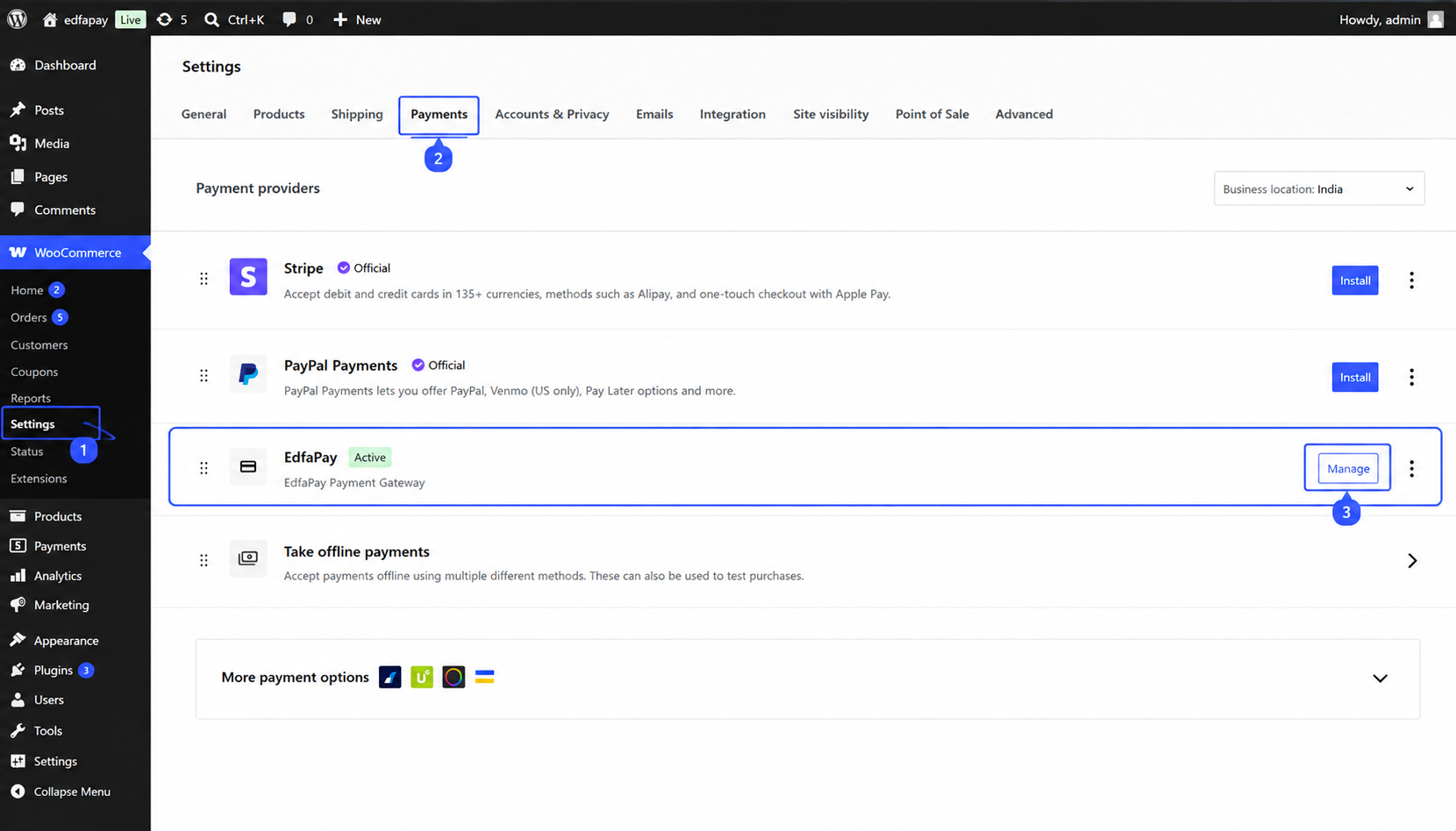
Navigate to:
WooCommerce → Settings → Payments
Locate EdfaPay and click Manage.
Steps to Configure Redirect Checkout
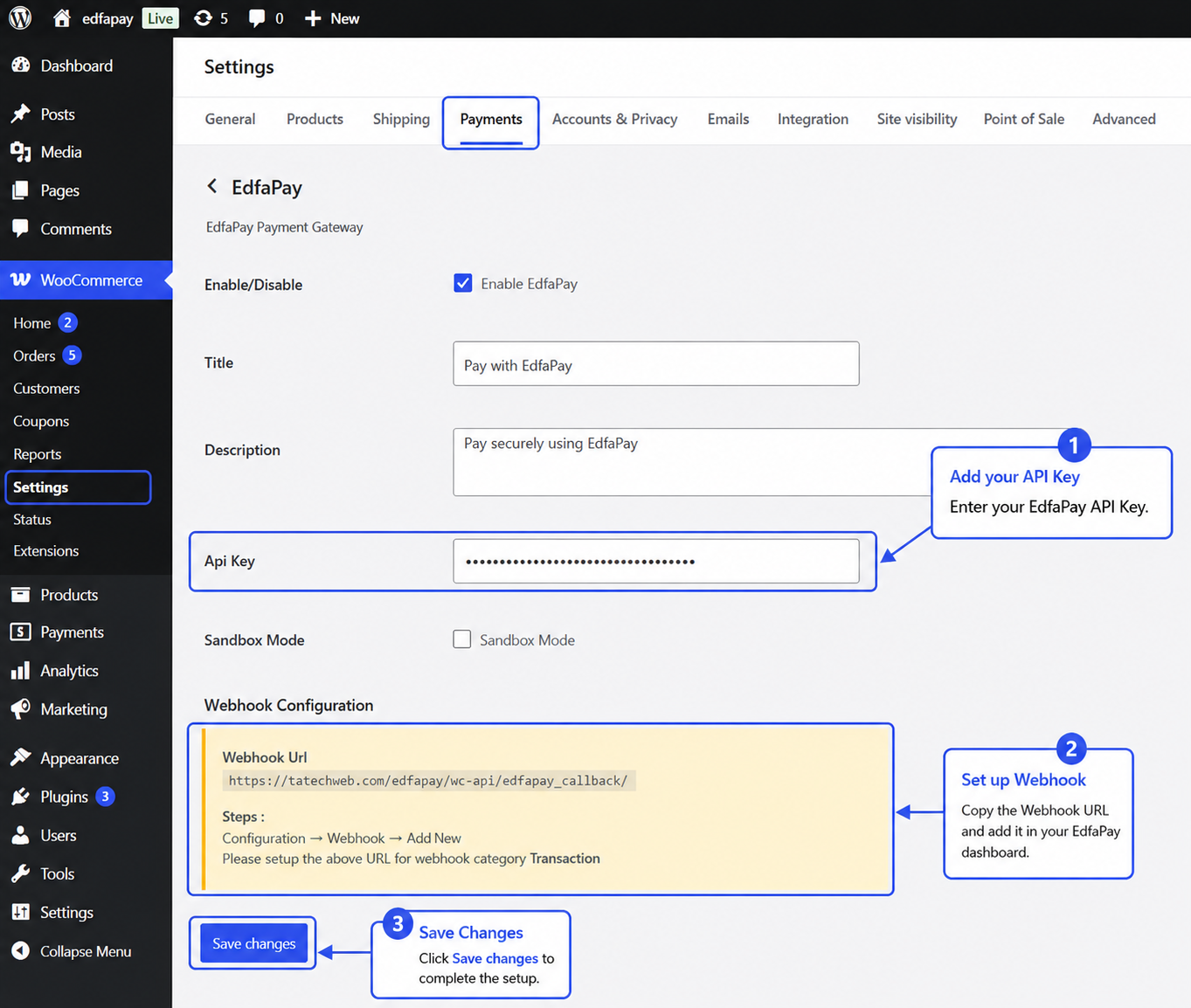
On the EdfaPay configuration page:
- Enter your API Key.
- Copy the Webhook URL displayed on the page.
- Configure the Webhook URL in your EdfaPay Merchant Dashboard under the Transaction webhook category.
- Click Save Changes to complete the setup.
Note
Sandbox Mode is intended for testing transactions in the Demo/Sandbox environment and should be enabled only during development or testing activities.
When using the Production (Live) environment, ensure that Sandbox Mode is disabled. Leaving Sandbox Mode enabled in a live environment may cause transactions to be routed to the sandbox environment and prevent live payment processing.
- Demo/Sandbox Environment: Sandbox Mode = Enabled
- Production/Live Environment: Sandbox Mode = Disabled
Note: Ensure that the correct environment URL is used:
- Use
demo.edfapay.comfor the Sandbox/Demo environment.- Use
app.edfapay.comfor the Production/Live environment.
ImportantWebhook configuration is required to receive automatic payment status updates and synchronize transaction information with WooCommerce.
Verify the Integration
Place a test order using EdfaPay and verify the following:
- The payment is processed successfully.
- The WooCommerce order status is updated automatically.
- Payment notifications are received through the configured webhook.
Installation Complete
Your EdfaPay WooCommerce integration is now ready to accept payments.
The following table describes all available configuration fields in the EdfaPay WooCommerce plugin :
| Title | Value | Description |
|---|---|---|
| Enable/Disable | checked | Enables the EdfaPay payment method and makes it available to customers during the checkout process. |
| Title | Pay with EdfaPay | Payment method title displayed to customers on the WooCommerce checkout page. |
| Description | Pay securely using EdfaPay | Payment method description displayed below the payment option during checkout. |
| API Key | <your_api_key> | Unique API key provided by EdfaPay and used for merchant authentication and payment processing. |
| Sandbox Mode | checked / unchecked | Enables Sandbox (test) mode for development and transaction testing. Disable this option when moving to production. |
| Webhook URL | Plugin-provided callback URL | Callback endpoint provided by the plugin and used by EdfaPay to send transaction notifications and payment status updates to WooCommerce. |
Important Notes
Webhook URL: The Webhook URL displayed in the EdfaPay plugin settings must be configured in your EdfaPay Dashboard to receive transaction notifications and payment status updates.
To configure the webhook, navigate to: Configurations → Webhooks → Add New
Select the Transaction category and enter the Webhook URL exactly as displayed in the plugin settings.
API Key: Ensure that the API Key is entered correctly and corresponds to the appropriate EdfaPay merchant account.
Sandbox Mode: Enable Sandbox Mode only for testing purposes. Make sure it is disabled when processing live transactions in the production environment.
After updating any plugin settings, click Save Changes to apply the new configuration.
Updated 4 months ago