
Token Management
Overview
Token Management The Token Management feature allows merchants and partners to generate and manage authentication tokens used for API integrations and SDK operations.
Secure Authentication Tokens are used to securely authenticate requests when integrating with EdfaPay APIs or using SoftPOS SDKs.
Token Types
API Token Used for server-to-server API integrations and backend system authentication.
SDK Token Used for SoftPOS and terminal-based operations.
Each token type is managed from specific locations within the dashboard.
API Token Management
Where to Find API Tokens
API tokens are managed from the Settings page.

API Token Actions
Copy – Copies the token for use in integrations
Disable – Revokes the token and blocks further usage
Generate Token – Creates a new API token
API Token Usage
The API token is used for:
Server-to-server API integrations
Backend system integrations
Secure authentication when calling EdfaPay APIs
The generated token can be copied and used directly in API requests.
SDK Token Management
SDK token is used for SoftPOS and terminal-based operations. It's available in multiple locations, depending on the user’s role and access level.
SDK tokens can be found in the Settings page for the following roles:
- Merchant
- User
- Terminal
From this page, users can generate and manage SDK tokens related to their role.

SDK token management is also accessible from the Users page.
- Open the Users page
- Select a user
- Click on the Actions button
- Select SDK Token Management
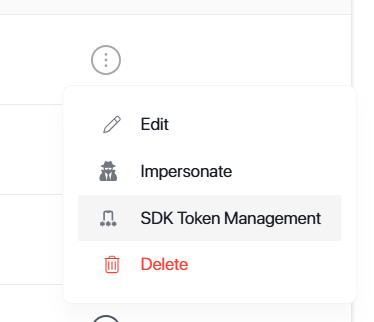
This option is available for:
- Partners
- Merchants
SDK tokens can also be generated through the Terminal page.
- Open the Terminal page
- Select a terminal
- Click on the Actions button
- Open the Terminal Profile
- Select the assigned user
- Click SDK Token Management
- Generate the SDK token
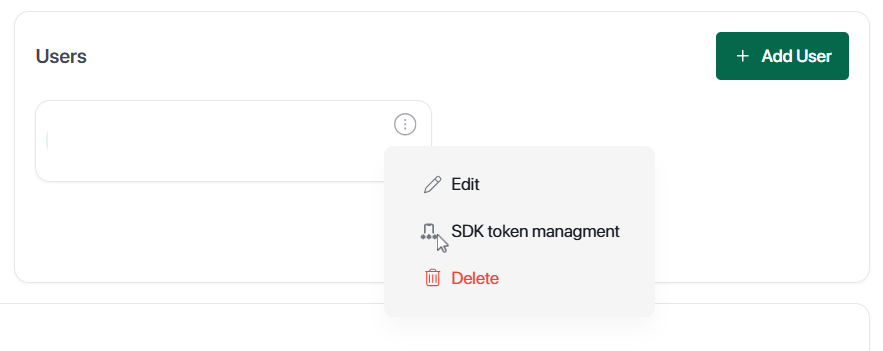
SDK Token Actions
Copy – Copies the token for use in integrations
Disable – Revokes the token and blocks further usage
Generate Token – Creates a new API token
Access & Permissions
Token visibility depends on user role
Partners and merchants can manage tokens under their scope
Tokens are restricted to authorized users only
Security NotesKeep tokens confidential - Never expose tokens in public repositories
Do not share tokens publicly - Treat tokens like passwords
Disable compromised tokens immediately - Act fast if a token is exposed
Regenerate tokens when rotating credentials - Regular rotation improves security
Updated 6 months ago