
Webhook
EdfaPay's Webhook API offers a robust and reliable method for your system to receive real-time notifications about transaction updates. This enables automated workflows such as confirming orders, updating payment statuses, and handling failures directly within your application without the need for constant polling.
EdfaPay sends a POST request to your configured notification_url after every significant payment event.
Security Note: SSL RequiredYour server must support HTTPS with a valid SSL certificate. HTTP endpoints are not supported.
Real-time Notifications Webhooks ensure your system receives updates instantly when transactions or events occur, keeping your data synchronized at all times.
Instant Updates Instead of repeatedly querying APIs, your system receives event data automatically via HTTP POST requests whenever a change happens.
Why Use Webhooks
Real-time Communication Receive transaction updates immediately as they occur.
Reduced API Usage Eliminate the need for frequent status polling.
Automation Support Automatically process payments, refunds, and transaction states.
Scalable Integration Designed to handle high transaction volumes efficiently.
How Webhooks Work
EdfaPay webhooks flow is shown below
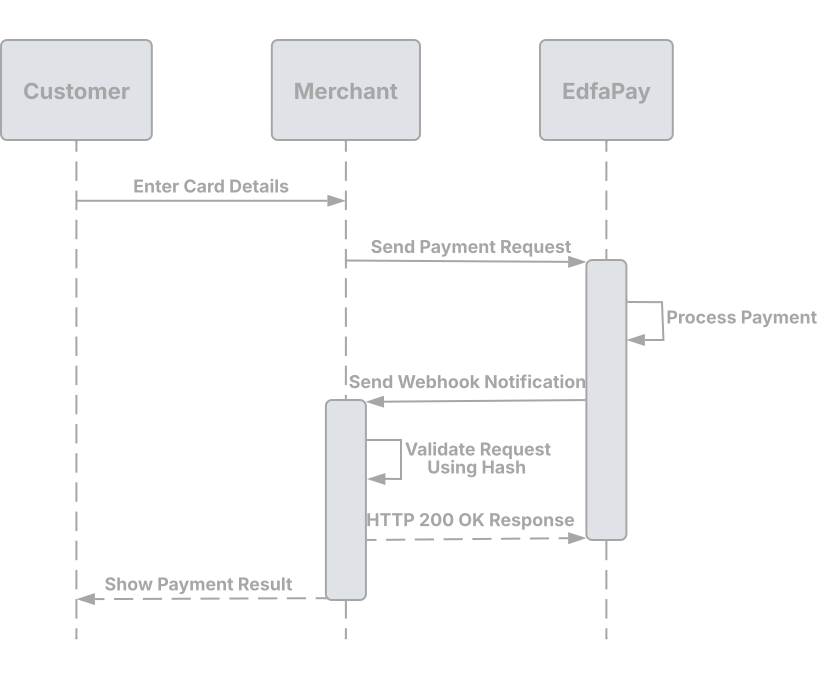
EdfaPay follows a simple and reliable webhook delivery process:
- Provide Your URL: Include a
notification_urlin your request - Event Occurs: A transaction or system event is processed
- Webhook Sent: EdfaPay sends an HTTP POST request with event data
- Acknowledge Receipt: Your server must return
HTTP 200 OK - Retry Mechanism: If no response is received, the request is retried up to 3 times
Setting Up Your Webhook Endpoint
To receive webhook notifications, you need to configure your endpoint in the EdfaPay Dashboard and ensure your system is ready to handle incoming requests.
Pre-requisite: Portal ConfigurationEnsure your webhook is configured in the EdfaPay Dashboard before implementing your endpoint
Your endpoint will be a publicly accessible URL, typically structured as:
https://your-domain.com/your-webhook-endpointEdfaPay will send event data to your configured endpoint using HTTP POST requests.
Webhook Documentation Guide
Setup instructions, webhook categories, and available events.
Monitor webhook activity, view request/response logs, and track delivery status.
Complete payload structures for all transaction types.
Explanation of transaction types and lifecycle.
Validate webhook authenticity and secure your integration.
Test your webhook endpoint and verify integration.
Webhook Delivery RequirementsThe request is sent using POST, with Content-Type: text/plain, the response must be HTTP 200 OK.
Security & Reliability
Security Requirements Webhook endpoints must be publicly accessible and secured using HTTPS. Validate incoming requests where applicable.
Reliable Delivery Webhooks are retried automatically if delivery fails. Your system must handle duplicate notifications safely.
Important Update NoteAlways keep your
notification_urlupdated in the EdfaPay Dashboard to ensure uninterrupted webhook delivery.
Extending Webhook Usage
Webhook capabilities can be extended as new features are introduced across EdfaPay services such as Payment Gateway, SoftPOS, Invoices, and Payment Links.
Updated 6 months ago