
| Time | Status | User Agent | |
|---|---|---|---|
Retrieving recent requests… | |||
Overview
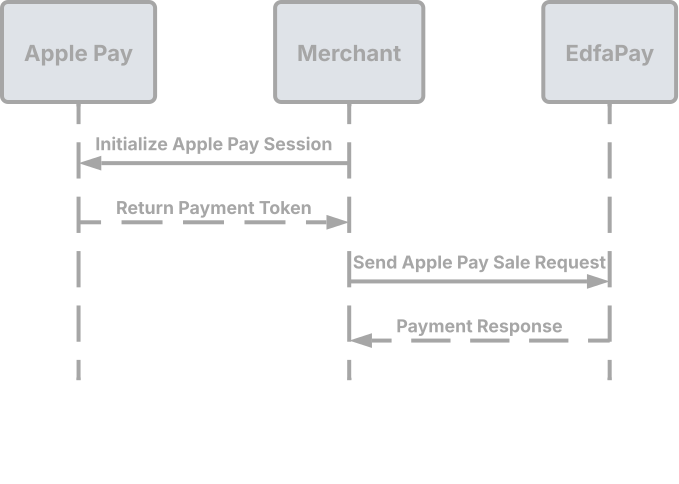
The Apple Pay S2S (Server-to-Server) Sale API facilitates secure processing of Apple Pay transactions. It enables merchants to transmit the Apple Pay payment token directly from their frontend to EdfaPay for authorization and capture.
Apple pay S2S payment flow is shown below
This integration method is particularly well-suited for merchants who:
- Maintain control over their checkout workflow.
- Have implemented the Apple Pay JS API within their website or application.
- Possess an Apple Developer Account and manage their own Apple Pay certificate and domain verification.
Important: Unlike the Checkout Integration, EdfaPay does not host the Apple Pay domain for S2S merchants. Consequently, merchants are solely responsible for independently configuring their Apple Pay environment.
Endpoint
POST https://app-api.edfapay.com/api/v1/payment-gateway/s2s/apple-pay
Content-Type: application/json
Security NoteAll API requests must be sent over HTTPS to ensure data integrity and confidentiality.
Authentication
All requests to this endpoint must include a valid X-API-KEY in the request header for authentication.
The X-API-KEY must be sent from the server side and must not be exposed on the client side.
Request Parameters
| Field | Type | Required | Description |
|---|---|---|---|
| orderId | String | Yes | Unique identifier for the order |
| amount | Number | Yes | Transaction amount |
| currency | String | Yes | Transaction currency in ISO format (e.g., SAR). |
| customer | Object | Yes | Customer details object |
| card | Object | Yes | Card details object |
| successUrl | String | Yes | Redirect URL after successful 3DS authentication |
| failureUrl | String | Yes | Redirect URL after failed 3DS authentication |
Customer Object
| Field | Type | Required | Description |
|---|---|---|---|
| name | String | Yes | Customer full name |
| String | Yes | Customer email address | |
| phone | String | Yes | Customer phone number |
Card Object
| Field | Type | Required | Description |
|---|---|---|---|
| token | String | Yes | Apple Pay payment token object from Apple Pay JS API |
For orderIdMust be unique per transaction. Duplicate
orderIdmay result in rejected payments.
Request Example
curl --location 'https://app-api.edfapay.com/api/v1/payment-gateway/s2s/apple-pay' \
--header 'X-API-KEY: <Your API Key>' \
--header 'Content-Type: application/json' \
--data-raw '{
  "orderId": "12345",
  "amount": 1.00,
  "currency": "SAR",
  "customer": {
    "name": "John",
    "email": "[email protected]",
    "phone": "+12345678"
  },
  "successUrl": "https://success.com",
  "failureUrl": "https://failure.com",
  "card": {
    "token": "{\"paymentData\":{\"data\":\"xxxxxxxxxxxxxx\",\"signature\":\"xxxxxxxxxx\",\"header\":{\"publicKeyHash\":\"xxxxxxxxx\",\"ephemeralPublicKey\":\"xxxxxxxxxxx\",\"transactionId\":\"xxxxxxxxxxxxxxx\"},\"version\":\"EC_v1\"},\"paymentMethod\":{\"displayName\":\"xxxx xxxx\",\"network\":\"xxxx\",\"type\":\"xxxx\"},\"transactionIdentifier\":\"xxxxxxx\"}"
  }
}'
Response Example
{
    "action": "SALE",
    "result": "SUCCESS",
    "status": "SETTLED",
    "order_id": "12345",
    "trans_id": "XXXXXXXXXXXXX",
    "trans_date": "29-03-2026 18:07:06",
    "descriptor": null,
    "decline_reason": null,
    "rrn": "XXXXXXXXXXXXX",
    "processor_mid": "XXXXXXXXXX"
}Notes for Merchants:
- It is crucial to validate the
resultfield; "SUCCESS" indicates a successful payment.- Retain the
trans_idandrrnfor purposes of refunds and comprehensive transaction tracking.