
| Time | Status | User Agent | |
|---|---|---|---|
Retrieving recent requests… | |||
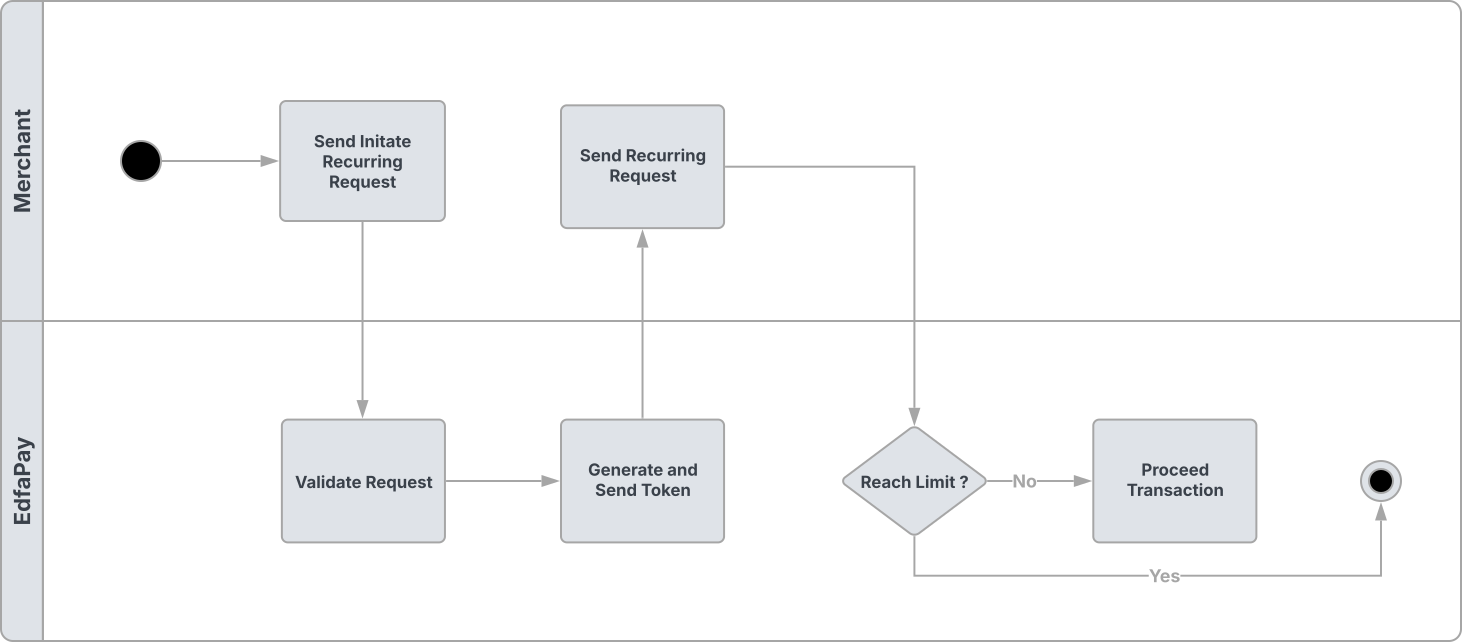
The Recurring API allows merchants to charge customers on a recurring basis (e.g., monthly, weekly) for subscription-based services. This is an unscheduled recurring API, giving merchants the flexibility to manage their own billing cycles and call the recurring API as needed.
Recurring payment flow is shown below.
Endpoint
POST https://app-api.edfapay.com/api/v1/payment-gateway/recurring
Content-Type: application/json
Authentication
All requests to this endpoint must include a valid X-API-KEY in the request header for authentication. The X-API-KEY must be sent from the server side and should not be exposed on the client side.
Request Body
| Field | Type | Required | Description |
|---|---|---|---|
| transactionId | String | Yes | Unique identifier for the transaction. |
| recurringToken | String | Yes | Token received after the initial transaction with recurring_init=Y. |
| order | Object | Yes | Order details object. |
| amount | Decimal | Yes | Total transaction amount. |
Order Object
| Field | Type | Required | Description |
|---|---|---|---|
| number | String | Yes | Unique order number. |
| amount | Decimal | Yes | Order amount. |
| currency | String | Yes | Currency code in ISO 4217 format (e.g., SAR). |
| description | String | Yes | Description of the order. |
Example Request
curl --location 'https://app-api.edfapay.com/api/v1/payment-gateway/recurring' \
--header 'accept: */*' \
--header 'X-API-KEY: <Your API Key>' \
--header 'Content-Type: application/json' \
--data '{
  "transactionId": "XXXXXXXX-XXXX-XXXX-XXXX-XXXXXXXXXXXX",
  "recurringToken": "XXXXXXXX-XXXX-XXXX-XXXX-XXXXXXXXXXXX",
  "order": {
    "number": "12345",
    "amount": 100,
    "currency": "SAR",
    "description": "Order"
  },
  "amount": 10
}'
How to Get recurringToken
recurringTokenTo use the Recurring API, the recurringToken must be obtained in advance. This token is provided to the merchant’s notification endpoint under the following conditions:
- The initial Initiate API call must include
"recurringInit": "Y" - The initial payment must be successful
Response Example
{
    "statusCode": 200,
    "responseBody": {
        "result": "SUCCESS",
        "status": "SUCCESS",
        "payment_id": "XXXXXXXXXXXXXXXXXXXXXXXXXX"
    }
}