
| Time | Status | User Agent | |
|---|---|---|---|
Retrieving recent requests… | |||
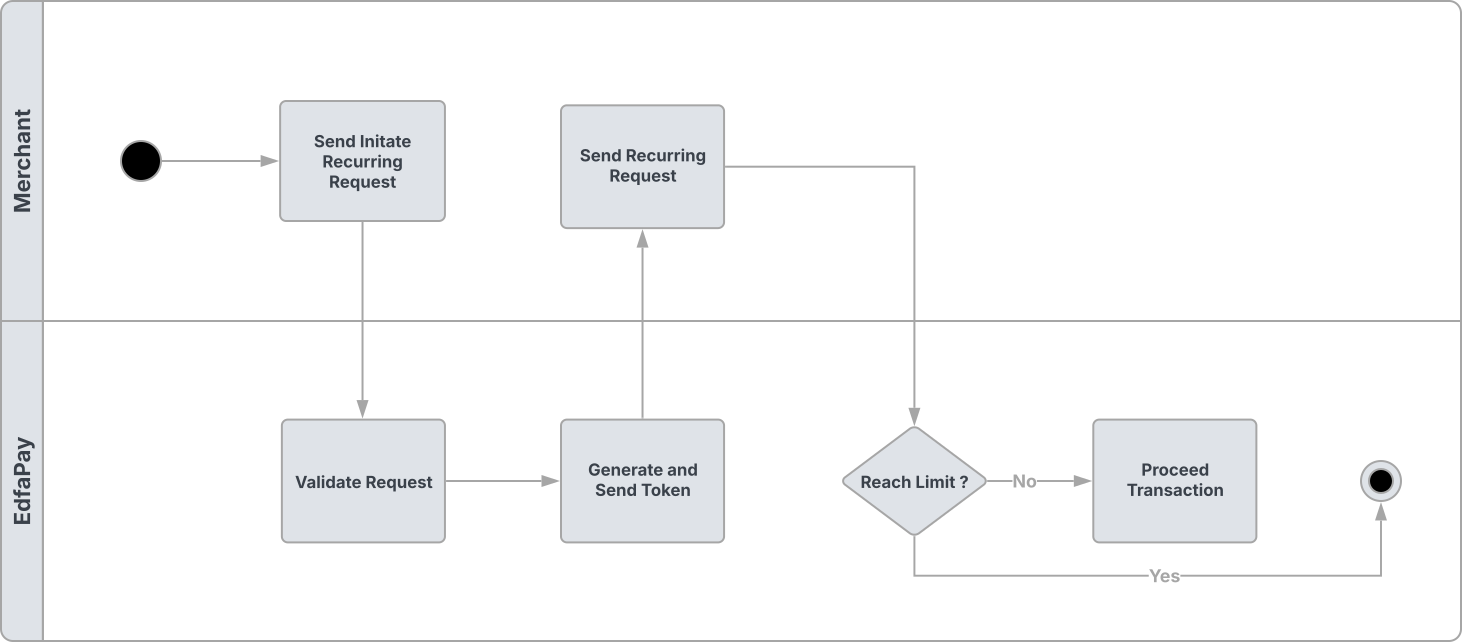
The Recurring API (S2S) allows merchants to charge customers on a recurring basis (e.g., subscriptions, installments) using a previously generated recurringToken.
This is an unscheduled recurring flow, meaning merchants control when charges are triggered from their backend systems.
Recurring Flow
Endpoint
POST https://app-api.edfapay.com/api/v1/payment-gateway/s2s/recurring
Content-Type: application/json
Authentication
All requests must include a valid X-API-KEY in the request header.
The API key must be generated from your dashboard and must only be used server-side.
Security Note
Never expose your API Key on the frontend or client-side applications.
Always send requests from your backend server.
Request Body
| Field | Type | Required | Description |
|---|---|---|---|
| transactionId | String | Yes | Unique identifier for the recurring transaction. |
| recurringToken | String | Yes | Token received from the initial payment. |
| amount | Decimal | Yes | Amount to be charged. |
| orderId | String | Yes | Unique order number |
| currency | String | Yes | Currency code (ISO 4217), e.g., USD, SAR. |
| order | Object | Yes | Order details object. |
Order Object
| Field | Type | Required | Description |
|---|---|---|---|
| number | String | Yes | Unique order number. |
| amount | Decimal | Yes | Order amount. |
| currency | String | Yes | Currency code (ISO 4217), e.g., USD, SAR. |
| description | String | Yes | Description of the order. |
Example Request
curl --location 'https://app-api.edfapay.com/api/v1/payment-gateway/s2s/recurring' \
--header 'x-api-key: <Api Key>' \
--header 'Content-Type: application/json' \
--data '{
  "transactionId": "xxxxxxxx-xxxx-xxxx-xxxx-xxxxxxxxxxxx",
  "orderId": "XXXXXXXXXXXX",
  "amount": 1,
  "currency": "SAR",
  "recurringToken": "TKN-xxxxxxxx-xxxx-xxxx-xxxx-xxxxxxxxxxxx",
  "order": {
    "number": "XXXXXXXXXXXX",
    "description": "Monthly subscription payment",
    "amount": 1,
    "currency": "SAR"
  }
}'
How to Get recurringToken
recurringTokenTo perform recurring payments, you must first obtain a recurringToken.
This token is generated during the initial payment under the following conditions:
- The initial payment request includes recurring initialization (e.g.,
recurringInit = Y) - The transaction is successfully completed
The token is then returned in the callback/webhook response and must be stored securely for future use.
The same recurring token can be reused for future charges until it is expired or revoked.
Response Example
{
  "code": 200,
  "message": "Success",
  "errorCode": null,
  "data": {
    "transactionId": "xxxxxxxx-xxxx-xxxx-xxxx-xxxxxxxxxxxx",
    "acquirerPaymentId": "xxxxxxxxxxxxxxxxxxxx",
    "amount": "1",
    "message": "Recurring transaction successful",
    "status": "APPROVED",
    "orderId": "XXXXXXXXXXXX",
    "recurringToken": "TKN-xxxxxxxx-xxxx-xxxx-xxxx-xxxxxxxxxxxx"
  }
}
Important Notes
Important Notes
Recurring payments require a valid recurring token.
The initial transaction must be successful to generate the token.
Merchants are responsible for managing billing cycles and retry logic.
Always validate transaction responses and webhook notifications.