
| Time | Status | User Agent | |
|---|---|---|---|
Retrieving recent requests… | |||
Introduction
This guide walks you through the complete integration process of EdfaPay’s Server-to-Server (S2S) Card Payment using the SALE action. The S2S SALE API allows merchants to charge cards securely with 3D Secure (3DS) redirection using a backend-to-backend call.
Endpoint
POST https://app-api.edfapay.com/api/v1/payment-gateway/s2s/sale
Content-Type: application/json
Authentication
All requests to this endpoint must include a valid X-API-KEY in the request header for authentication, along with a hash parameter in the request body to validate and secure sensitive data.
The X-API-KEY must be sent from the server side and must not be exposed on the client side.
Request Parameters
| Field | Type | Required | Description |
|---|---|---|---|
| orderId | String | Yes | Unique identifier for the order |
| amount | Number | Yes | Transaction amount |
| currency | String | Yes | Transaction currency in ISO format (e.g., SAR). |
| suppliers | Array | Optional | List of suppliers for split payment distribution. |
| paymentMethod | String | Yes | Payment method used should be card |
| auth | String | Yes | Set to Y for an authorization-only payment otherwise, set it to N |
| card | Object | Yes | Card details object |
| customer | Object | Yes | Customer details object |
| successUrl | String | Yes | Redirect URL after successful 3DS authentication |
| failureUrl | String | Yes | Redirect URL after failed 3DS authentication |
| hash | String | Yes | Request hash for validation |
Suppliers Object
| Field | Type | Required | Description |
|---|---|---|---|
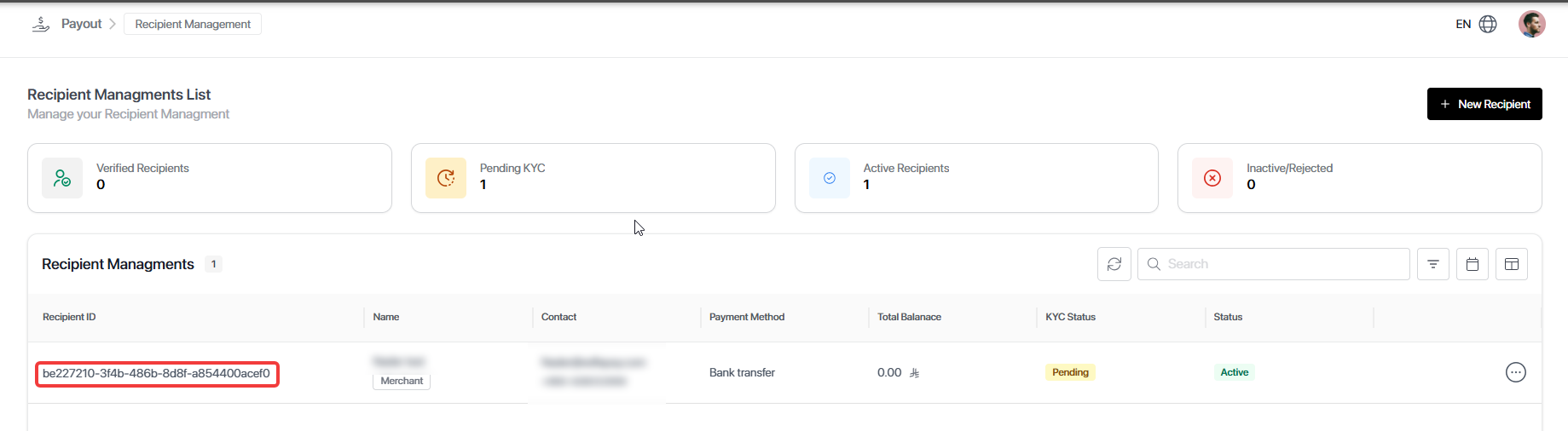
| recipientId | String | Yes | Recipient identifier from Payout → Recipient Management. |
| amount | Decimal | Yes | Amount to be transferred to the specified recipient. |
The
recipientIdcan be obtained from Payout → Recipient Management in the merchant dashboard.
Card Object
| Field | Type | Required | Description |
|---|---|---|---|
| cardNumber | String | Yes | Card number |
| cardExpiryMonth | String | Yes | Card expiry month (MM) |
| cardExpiryYear | String | Yes | Card expiry year (YYYY) |
| cardCvv | String | Yes | Card CVV code |
Customer Object
| Field | Type | Required | Description |
|---|---|---|---|
| name | String | Yes | Customer full name |
| String | Yes | Customer email address | |
| phone | String | Yes | Customer phone number |
Hash Generation (Request Authentication)
To secure your API request, you must generate a hash using the request data and your secret merchant password. This hash ensures that the request is authentic and hasn’t been tampered with.
Formula
var apiKey = "XXXXXXXXXXXXXX";
var cardNumber = "XXXXXXXXXXXXXXXX";
var email = "[email protected]";

const ReverseString = str => [...str].reverse().join('');

var final = (ReverseString(email) + apiKey + ReverseString(cardNumber.substr(0, 6) + cardNumber.substr(-4))).toUpperCase();
var finalHash = CryptoJS.MD5(final).toString();
Common MistakesMake sure to reverse the email and card segments correctly. Any mismatch between hash calculation on your side and our validation will cause the request to fail.
Notes:
- apiKey→ Your API key from EdfaPay.
- cardNumber → The full card number entered by the customer.
- email → The customer’s email used in hash generation.
Example cURL Request
curl --location 'https://app-api.edfapay.com/api/v1/payment-gateway/s2s/sale' \
--header 'X-API-KEY: <Your API Key>' \
--header 'Content-Type: application/json' \
--data-raw '{
  "orderId": "12345",
  "amount": 100,
  "currency": "SAR",
  "recurringInit": "Y",
  "paymentMethod": "card",
  "auth": "Y",
  "customer": {
    "name": "xxxx",
    "email": "[email protected]",
    "phone": "xxxxxxxxxxxx",
    "idNumber": "XXXXXXX",
    "idType": "XXXXXXX",
    "taxNumber": "XXXXXXX"
  },
  "billingAddress": null,
  "invoice": null,
  "successUrl": "https://www.success.com/",
  "failureUrl": "https://www.failure.com/",
"hash": "xxxxxxxxxxx",
  "card": {
    "initiateRequestId": null,
    "cardNumber": "5123450000000008",
    "cardHolder": "XXXXXXX",
    "cardExpiryMonth": "01",
    "cardExpiryYear": "2039",
    "cardScheme": "P1",
    "cardCvv": "100",
    "token": ""
  }
}Important Note — Hash Generation
The hash parameter included in the request body is dynamically generated for each request and must not be hardcoded.
The hash value is calculated using specific request parameters combined with your merchant API key. Any change in the request data requires regenerating the hash before sending the request.
Response Example
{
    "code": 200,
    "message": "Success",
    "errorCode": null,
    "data": {
        "result": "Pending",
        "paymentId": "xxxxxxxx-xxxx-xxxx-xxxx-xxxxxxxxxxxx",
        "acquirerPaymentId": "XXXXXXXXXXXXXXXXXXXXXX",
        "status": "SUCCESS",
        "html": "3DS PAGE HTML"
    }
}
Handling 3DS Redirection
When the response contains the html field, it means that 3D Secure authentication is required and the transaction is in a Pending state.
The value of html is a complete HTML page provided by EdfaPay. You must render this HTML to display the 3DS challenge to the customer.
What You Need to Do Extract the html value from the response. Render it directly in your application: Web: Display it inside an iframe or redirect the user to a page that renders this HTML. Mobile App: Load the HTML inside a WebView. Important Notes
Do not modify the HTML content. The customer will complete the authentication within this page. After completion, the customer will be automatically redirected to your
successUrlorfailureUrlbased on the authentication result.
Important Notes
- Do not expose your
X-API-KEYto the client. - If the hash is invalid, the API will return an error and not generate a checkout session.
- You will find the Sale Request in the Postman Collection.